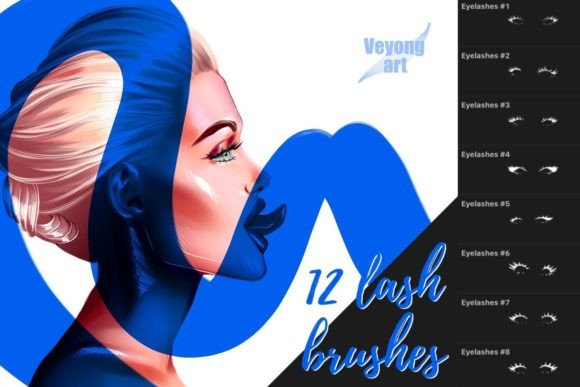
Beautiful Eyelashes Set: A Practical Guide for Procreate Artists
Digital illustration has evolved significantly, allowing artists to achieve photorealistic results with greater efficiency. Among the many tools available to portrait and character artists, specialized brush sets have become essential for streamlining workflows. The Beautiful Eyelashes Set is one such resource, designed specifically for users of the Procreate application on iPad. This collection includes twelve distinct lash brushes and stamps intended to simplify the process of drawing intricate eye details. However, like any digital asset, it comes with specific technical requirements and limitations that prospective users must understand before integrating it into their toolkit.
Understanding the Tool and Its Purpose
The primary function of the Beautiful Eyelashes Set is to reduce the time spent on repetitive manual detailing. Drawing individual eyelashes by hand can be tedious and requires a steady hand to maintain consistency in length, curvature, and thickness. This set addresses that challenge by providing pre-designed shapes that mimic natural lash patterns. The twelve included brushes offer variety, ranging from subtle lower lashes to dramatic, voluminous upper lashes.
It is crucial to note that these assets are engineered exclusively for Procreate. They are not compatible with other digital art software such as Adobe Photoshop, Clip Studio Paint, or Corel Painter. This limitation stems from the proprietary brush engine used by Procreate, which handles stamp dynamics and texture differently than other platforms. Therefore, artists who work across multiple applications should consider whether a single-platform tool aligns with their broader workflow.
Technical Considerations and Workflow Integration
While the brushes provide a strong foundation, they are not a "one-click" solution for perfect eyes. The documentation and user experiences suggest that achieving a natural look requires post-application adjustments. Specifically, the use of the Transformation and Liquify tools within Procreate is recommended for best effects.
The Transformation tool allows artists to resize, rotate, and distort the lash stamps to fit the unique angle and shape of the eye they are illustrating. Since no two eyes are identical, a static stamp will rarely align perfectly without adjustment. The Liquify tool further enhances realism by allowing subtle warping of the lash lines. This helps blend the stamped elements with the underlying eye structure, softening harsh edges and ensuring the lashes follow the natural curvature of the eyelid. Artists who are unfamiliar with these auxiliary tools may find the initial results stiff or unnatural, indicating a learning curve associated with this set.
Benefits for Digital Artists
For artists who frequently illustrate portraits, fashion sketches, or character designs, the Beautiful Eyelashes Set offers several tangible benefits. The most significant advantage is time efficiency. By bypassing the need to draw each lash individually, artists can allocate more time to shading, coloring, and refining other facial features. This is particularly valuable for professionals working under tight deadlines or content creators who need to produce high volumes of artwork.
Additionally, the set provides consistency. Manual lash drawing can result in uneven spacing or varying thicknesses, which may distract from the overall quality of the piece. Pre-made stamps ensure a uniform style, which can be beneficial for maintaining a cohesive aesthetic across a series of illustrations. The variety within the twelve brushes also allows for customization, enabling artists to mix and match styles to suit different character archetypes, from natural and minimal to bold and theatrical.
Tradeoffs and Limitations
Despite its advantages, the set is not without tradeoffs. The reliance on stamps can sometimes lead to a generic appearance if not carefully modified. Overuse of default settings may result in illustrations that lack the organic imperfections found in real human anatomy. Therefore, the tool demands a certain level of artistic skill to manipulate effectively. It is not a substitute for understanding eye anatomy but rather an aid to expedite the rendering process.
Another consideration is the platform lock-in. As mentioned, the incompatibility with non-Procreate software limits its utility for artists who switch between devices or programs. If an artist begins a sketch on an iPad but finishes it on a desktop computer using Photoshop, they cannot directly transfer these brush assets. This necessitates a committed workflow within the Apple ecosystem.
Ideal Use Cases
The Beautiful Eyelashes Set is a strong fit for specific scenarios. It is particularly useful for:
- Fashion Illustrators: Who often need to produce stylized, high-impact eye looks quickly.
- Character Designers: Who need to iterate through multiple facial expressions and angles without getting bogged down in minute details.
- Beginner to Intermediate Procreate Users: Who may struggle with the fine motor control required for manual lash drawing but want to achieve polished results.
- Social Media Content Creators: Who benefit from streamlined workflows to maintain consistent posting schedules.
In these contexts, the tool serves as a force multiplier, enhancing productivity without sacrificing visual quality, provided the user employs the recommended transformation techniques.
When to Consider Alternatives
There are situations where alternative approaches may be more appropriate. Artists who prioritize hyper-realism and have advanced manual drawing skills might prefer creating lashes from scratch. This approach allows for complete control over every hair's trajectory, thickness, and transparency, offering a level of nuance that stamps may not fully replicate.
Furthermore, artists who do not use Procreate should look for brush sets compatible with their preferred software. Many marketplaces offer similar lash brushes for Photoshop or Clip Studio Paint. Additionally, those who work primarily in vector-based programs like Adobe Illustrator will find raster-based Procreate brushes unusable, necessitating the creation of custom vector assets or the purchase of SVG-compatible libraries.
Making an Informed Decision
Evaluating whether the Beautiful Eyelashes Set aligns with your needs requires an honest assessment of your current workflow and technical environment. If you are a dedicated Procreate user looking to speed up your portrait workflow, this set offers a practical solution. The inclusion of twelve varied brushes provides enough flexibility to avoid repetitive patterns, while the requirement to use Transformation and Liquify tools encourages active engagement with the artwork, preventing a purely automated look.
However, if you value cross-platform compatibility or prefer total manual control over every detail, this tool may not meet your expectations. It is essential to view these brushes as aids rather than replacements for artistic judgment. Success with this set depends on the user's willingness to refine and adjust the stamped elements to fit the specific context of each illustration.
Ultimately, the decision hinges on your balance between speed and customization. For many digital artists, the Beautiful Eyelashes Set represents a worthwhile investment in efficiency, provided they are prepared to invest the time in learning how to integrate these assets seamlessly into their existing artistic process. By understanding both the capabilities and the constraints of the tool, artists can make a choice that supports their creative goals and technical requirements.