Streamlining Digital Illustration Workflows with the Melody Procreate Brush Stamp
In the evolving landscape of digital art and design, efficiency is often just as critical as creativity. For professionals, hobbyists, and entrepreneurs who rely on visual communication, the ability to execute ideas quickly without sacrificing quality is a significant competitive advantage. This is where specialized tools like the Melody Procreate Brush Stamp collection become indispensable. Rather than serving merely as decorative elements, these stamps function as strategic assets within a broader creative workflow, allowing users to bridge the gap between conceptualization and final execution with greater speed and consistency.
The Melody Stamp Brush set is designed specifically for the Procreate ecosystem, targeting users who understand the value of modular design components. Whether you are a marketer creating social media graphics, an educator designing engaging lesson materials, or a freelance illustrator working against tight deadlines, integrating pre-made, high-quality stamp brushes can drastically reduce repetitive manual labor. This article explores how to effectively incorporate the Melody Procreate Brush Stamp into your daily routine, ensuring that technology serves your creative process rather than complicating it.
Understanding the Role of Stamp Brushes in Modern Design
Before diving into installation and technical specifics, it is essential to understand where the Melody Procreate Brush Stamp fits within a professional workflow. In traditional digital painting, every element is often drawn from scratch. While this offers maximum control, it is time-consuming. Stamp brushes, by contrast, allow for the rapid placement of complex shapes, textures, or motifs with a single tap or stroke.
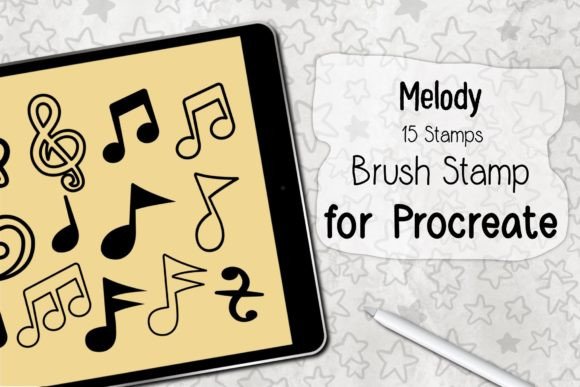
This does not mean sacrificing originality. Instead, it shifts the artist’s focus from manual rendering to composition and arrangement. The Melody set, containing 15 distinct stamps, provides a curated library of elements that can be layered, resized, and manipulated. This approach is particularly valuable for projects requiring visual consistency, such as branding kits, pattern design, or serialized content creation. By using a standardized set of brushes, creators ensure that their output maintains a cohesive aesthetic across different platforms and mediums.
Technical Requirements and Compatibility
To leverage the full potential of the Melody Procreate Brush Stamp, users must ensure their hardware and software environment meets specific criteria. Digital tools are only as effective as the system running them, and compatibility issues can disrupt even the most well-planned workflows.
The primary requirement is the Procreate application, specifically version 5.0 or higher. This version introduced significant improvements to brush engine stability and file handling, which are crucial for the smooth operation of complex brush sets. Users operating on older versions may experience lag, incorrect rendering, or installation failures.
Hardware-wise, the set is optimized for iPad Pro or standard iPad models paired with an Apple Pencil or a compatible, pressure-sensitive stylus. While Procreate can be used with finger touches, the precision offered by a stylus is vital when positioning stamps accurately or adjusting their opacity and size dynamically. The pressure sensitivity allows for nuanced control, enabling users to vary the intensity or scale of the stamp based on how hard they press, adding a layer of organic variation to digital elements.
Installation and Setup Process
Integrating the Melody Procreate Brush Stamp into your library is a straightforward process, but following the correct steps ensures that files are organized and accessible when needed. The product is delivered as a ZIP file, a common compression format that keeps the brush set intact during download.
- Download and Extract: Begin by downloading the ZIP file to your iPad. Use the Files app to locate the download and unzip it. This step reveals the
.brushsetfile, which is the native format Procreate uses to recognize and install brush libraries. - Open in Procreate: Tap on the
.brushsetfile and select "Open in Procreate." The application will automatically detect the file type and initiate the installation process. You will see a confirmation message indicating that the brushes have been added to your library. - Verify Installation: Open the Brush Library in Procreate. The new set should appear as a distinct folder, typically named "Melody" or similar, containing the 15 individual stamp brushes. It is advisable to test each brush on a blank canvas to familiarize yourself with their default settings and behaviors.
This seamless installation process highlights the user-friendly nature of the Procreate ecosystem. Unlike desktop software that may require complex plugin management, Procreate’s mobile-first design allows for immediate deployment of new assets, minimizing downtime between purchase and production.
Integrating Stamps into Your Creative Workflow
Once installed, the real work begins: integrating the Melody Procreate Brush Stamp into your actual projects. Successful implementation requires more than just dropping stamps onto a canvas; it involves thoughtful planning and layer management.
Preparation and Organization
Effective use of stamp brushes starts with preparation. Before beginning a project, consider which of the 15 stamps align with your visual goals. Create a mood board or sketch a rough layout to determine where these elements will add value. Organizing your Procreate layers is also critical. Keep stamp elements on separate layers from your base illustrations or backgrounds. This non-destructive approach allows you to move, resize, or adjust the opacity of individual stamps without affecting the rest of your artwork.
Execution and Customization
During the creation phase, use the Melody stamps to accelerate repetitive tasks. For instance, if you are designing a pattern, use the stamps to establish the core motif, then duplicate and rotate the layers to create symmetry. If you are illustrating a scene, use the stamps to add texture or background details that would otherwise take hours to draw manually.
Remember that stamps are not static. Procreate’s adjustment tools allow you to modify hue, saturation, and brightness. You can also apply blending modes to integrate the stamps seamlessly with underlying colors. Experimenting with these settings helps avoid the "copy-paste" look, ensuring that each element feels unique and tailored to the specific composition.
Quality Control and Consistency
For professionals, consistency is key. When using the Melody Procreate Brush Stamp across multiple projects or for a client brand, maintain a style guide. Document which stamps are used, their typical sizes, and any color modifications applied. This documentation ensures that future work remains aligned with previous outputs, reinforcing brand identity or artistic signature. Regularly review your canvases at different zoom levels to check for pixelation or alignment issues, ensuring high-quality output suitable for print or high-resolution digital display.
Long-Term Value and Efficiency
The investment in a tool like the Melody Procreate Brush Stamp pays dividends over time through increased efficiency. By reducing the time spent on manual rendering of common elements, creators can allocate more resources to conceptual development, client communication, or learning new techniques. This shift from execution to strategy is what separates hobbyists from professionals.
Furthermore, the versatility of the 15-stamp set means it can adapt to various industries. Educators can use them to create engaging visual aids; marketers can produce quick social media assets; and designers can prototype layouts rapidly. The key is to view these brushes not as shortcuts, but as foundational building blocks that support a more robust and scalable creative process.
In conclusion, the Melody Procreate Brush Stamp is more than a collection of digital images; it is a workflow enhancer designed for the modern creator. By understanding its technical requirements, mastering its installation, and strategically integrating it into your design process, you can achieve higher productivity and consistent quality. As digital tools continue to evolve, the ability to leverage such assets effectively will remain a crucial skill for anyone serious about their creative craft.