Watercolor Brush Bundle VI 06: A Practical Evaluation for Digital Artists
In the rapidly evolving landscape of digital art, the tools an artist chooses can significantly influence both workflow efficiency and the final aesthetic quality of a piece. Among the myriad resources available to illustrators and designers, specialized brush packs have become essential assets. The Watercolor Brush Bundle VI 06 has emerged as a notable option for creators seeking to replicate the organic, fluid characteristics of traditional watercolor painting within digital environments such as Adobe Photoshop. This article provides a balanced, practical evaluation of this bundle, exploring its features, potential benefits, and how it fits into the broader ecosystem of digital art tools.
Understanding the Core Features of Watercolor Brush Bundle VI 06
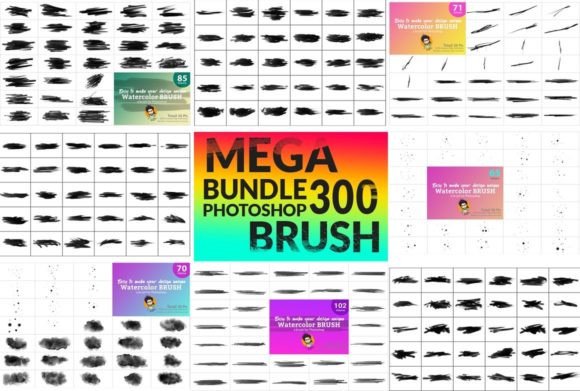
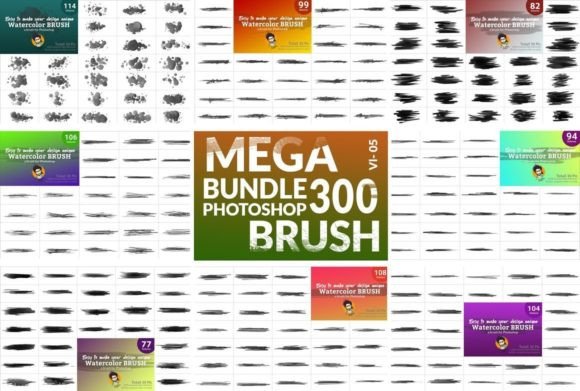
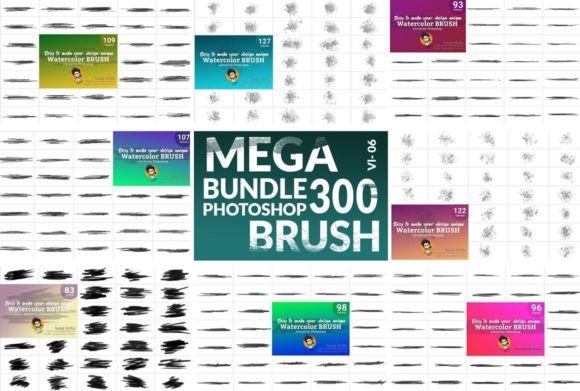
The Watercolor Brush Bundle VI 06 is designed to bridge the gap between traditional media and digital convenience. At its core, this product offers a comprehensive collection of brushes intended to mimic the behavior of water-based pigments. The bundle includes ten distinct sets, totaling 300 individual brushes. This volume is significant because it provides artists with a wide variety of angles, sizes, and shapes, allowing for nuanced control over texture and flow.
One of the distinguishing features of this bundle is the inclusion of an Auto Texture Edit option. For digital artists, achieving a natural look often requires manual adjustment of opacity, flow, and scattering settings. By integrating automated texture editing, this bundle aims to reduce the technical overhead, enabling users to focus more on composition and color theory rather than software configuration. The result is intended to be a "natural and original water color flavor" that adapts dynamically to user input, regardless of the specific color palette chosen.
Comparative Analysis: Specialized Bundles vs. Standard Libraries
When evaluating whether to invest in a specialized product like the Watercolor Brush Bundle VI 06, it is helpful to compare it against standard software libraries and other market alternatives. Most professional graphic design software comes with a default set of brushes. While these are functional, they often lack the specific textural depth required for realistic watercolor effects. Standard brushes may appear too uniform or digital, lacking the unpredictable bleeding and granulation that characterize traditional watercolor paper and pigment interactions.
Specialized bundles, such as this one, address these limitations by offering pre-configured dynamics that simulate physical properties. However, this specialization comes with tradeoffs. A general-purpose brush library offers versatility across various styles—from ink to oil to charcoal—whereas a watercolor-specific bundle is optimized for a single aesthetic. For artists who work exclusively in watercolor styles, the depth provided by 300 specialized brushes is invaluable. For generalists who switch mediums frequently, the utility may be more limited, serving as a supplementary tool rather than a primary resource.
Key Differentiators
- Volume and Variety: With 10 sets and 300 brushes, the bundle offers extensive coverage of different stroke types, from fine details to broad washes.
- Automation Features: The Auto Texture Edit function simplifies the process of achieving realistic results, which is particularly beneficial for beginners or professionals working under tight deadlines.
- Dynamic Adaptability: The brushes are designed to respond to pressure and tilt, providing a more intuitive drawing experience that mimics the feel of a physical brush on paper.
Assessing Value and Accessibility
Pricing and accessibility are critical factors in the decision-making process for digital resources. The promotional context surrounding the Watercolor Brush Bundle VI 06 highlights a significant discount, positioning it as a high-value acquisition. The claim that the cost is comparable to "water" suggests an aggressive pricing strategy aimed at widespread adoption. For budget-conscious students, hobbyists, or freelance designers, this low barrier to entry makes experimenting with new tools less financially risky.
However, it is important to approach such offers with a practical mindset. While the initial price point is attractive, the true value lies in the longevity and usability of the product. A cheap tool that saves hours of work per week offers a higher return on investment than an expensive tool that requires constant tweaking. If the Watercolor Brush Bundle VI 06 delivers consistent, high-quality results that integrate seamlessly into existing workflows, the initial cost becomes negligible over time. Conversely, if the brushes require excessive customization to look acceptable, the time cost may outweigh the financial savings.
Practical Use Cases and Workflow Integration
To determine if this bundle is the right fit, consider how it aligns with specific project requirements. The versatility of the 300 brushes makes them suitable for a range of applications:
- Illustration and Concept Art: Artists creating book covers, character designs, or environmental concepts can use these brushes to add organic warmth and depth to their compositions.
- Graphic Design and Branding: For projects requiring a handcrafted, artisanal feel, watercolor textures can soften corporate aesthetics and add a human touch.
- Photo Manipulation: Designers can overlay watercolor effects onto photographs to create hybrid artworks that blend realism with artistic interpretation.
The mention of a demonstration video is a crucial resource for potential users. Watching the brushes in action allows artists to assess the responsiveness and texture quality before committing. It provides evidence of how the "dynamic brush" feature performs in real-time scenarios, offering a clearer picture of what to expect compared to static screenshots or descriptions.
Limitations and Considerations
While the Watercolor Brush Bundle VI 06 offers compelling features, it is not a universal solution for all digital painting needs. Users should be aware of certain limitations:
Software Compatibility: These brushes are specifically designed for Photoshop. Artists using Procreate, Clip Studio Paint, or other digital art platforms will need to verify compatibility or seek alternative formats. Importing brushes across different software can sometimes result in loss of dynamic settings or texture fidelity.
Learning Curve: Despite the Auto Texture Edit feature, mastering watercolor techniques digitally still requires skill. Understanding how digital opacity and flow interact is different from managing water and pigment ratios in traditional media. Beginners may need to invest time in learning how to leverage the full potential of the 300 brushes rather than relying on a few favorites.
Style Specificity: If an artist’s style leans towards hard-edge vector graphics or hyper-realistic 3D rendering, a watercolor bundle will have limited application. It is a niche tool for a specific aesthetic.
Making an Informed Decision
Choosing the right digital tools is a personal process that depends on individual workflow, artistic goals, and budget. The Watercolor Brush Bundle VI 06 presents a strong case for artists who prioritize organic textures and efficient workflows. Its extensive library of 300 brushes and automated texture features offer a practical solution for achieving professional-grade watercolor effects without the mess and unpredictability of traditional media.
For those currently struggling with flat, digital-looking paintings or spending excessive time manually creating watercolor textures, this bundle could serve as a valuable upgrade. The current pricing structure further enhances its appeal, making it an accessible experiment for those looking to expand their toolkit. However, users should ensure that their primary software supports these brushes and that their artistic direction aligns with the watercolor medium.
Ultimately, the decision to download and integrate the Watercolor Brush Bundle VI 06 should be based on a clear understanding of your creative needs. By evaluating the features against your current challenges and comparing them with existing resources, you can determine whether this tool will genuinely enhance your artistic output. As with any creative resource, the best way to assess its value is to test it within your own projects, observing how it impacts both your process and your final results.