Mastering Digital Art with the Leaf Brush: A Comprehensive Guide to Natural Textures
In the rapidly evolving world of digital illustration, the quest for authenticity often leads artists back to nature. Among the most sought-after tools for creating organic, lifelike compositions is the Leaf Brush. Whether you are designing intricate botanical patterns, painting lush forest landscapes, or adding subtle natural accents to character designs, understanding how to effectively utilize this specific tool can transform your workflow. This article explores the significance of the Leaf Brush, breaks down what you receive in a standard digital package, and provides practical advice on integrating these assets into your creative process.
Understanding the Digital Leaf Brush
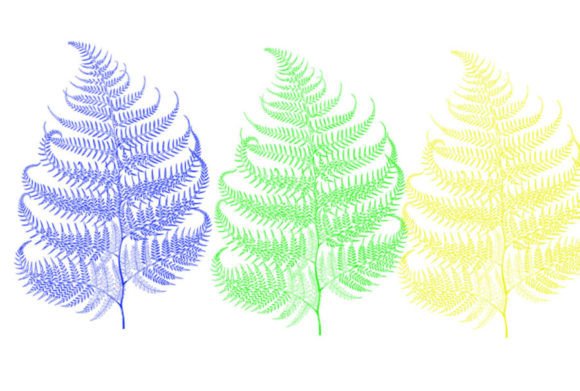
At its core, a Leaf Brush is a custom preset designed for digital painting software such as Adobe Photoshop, Procreate, or Clip Studio Paint. Unlike standard round or square brushes that produce uniform strokes, a Leaf Brush is engineered to mimic the irregular shapes, veins, and textures of real foliage. When you press your stylus to the tablet, the brush stamp applies a pre-designed leaf shape, often with varying degrees of opacity, scattering, and rotation.
The primary purpose of this tool is efficiency. Painting individual leaves by hand, one by one, is a labor-intensive process that requires significant time and patience. By using a specialized brush, artists can populate a canvas with hundreds of natural elements in minutes. This allows creators to focus less on repetitive manual labor and more on composition, lighting, and color theory. For beginners, it lowers the barrier to entry for creating complex nature scenes. For professionals, it serves as a powerful time-saving asset that maintains high-quality standards.
The Significance of Organic Textures in Modern Design
In an era dominated by sleek, geometric, and minimalist digital interfaces, there is a growing appreciation for organic textures. This trend, often referred to as "biophilic design," seeks to connect users with nature through visual cues. The Leaf Brush plays a pivotal role in this movement. It allows graphic designers, web developers, and illustrators to introduce warmth and humanity into their projects.
Consider the application in branding. A company focused on sustainability, organic foods, or eco-friendly products will heavily rely on botanical imagery. Using a high-quality Leaf Brush ensures that these visuals look authentic rather than clip-art-like. The nuance in the brush stroke—the way the tip of the leaf tapers or how the veins catch the light—adds a layer of professionalism that generic shapes cannot achieve. This attention to detail builds trust with the audience, reinforcing the brand’s commitment to quality and nature.
What’s Included in This Brush Set
When you purchase or download a premium Leaf Brush set, it is crucial to understand exactly what you are getting. Many newcomers to digital art are confused by file formats and installation processes. Let’s clarify the contents typically found in this specific package.
🔥 WHAT’S INCLUDED IN THIS BRUSH SET:
- The ZIP File: The entire package is compressed into a single ZIP archive. This ensures that all files remain organized and are easy to transfer between devices. You will need to extract or unzip this folder before installing the brushes.
- File Formats (.brushes or .swatches): Inside the ZIP file, you will find the actual brush data. Depending on the software compatibility, these will be in
.brushesformat (common for Photoshop) or.swatches(often used for color palettes associated with the brush). These formats ensure that the brush retains its dynamic properties, such as pressure sensitivity and scatter settings. - 1 Brush: This specific set focuses on quality over quantity, providing one highly optimized, versatile Leaf Brush. Rather than overwhelming you with dozens of similar variations, this single brush is tuned to handle multiple scenarios through adjustable settings.
It is a common misconception that more brushes equal better value. In reality, mastering a single, well-engineered brush is far more beneficial than having a library of mediocre ones. This 1 Brush approach encourages users to learn the nuances of the tool, such as adjusting the spacing, angle jitter, and size dynamics, to create diverse results from a single source.
Practical Applications and Creative Uses
Now that we understand what the tool is and what is included, let’s explore how to use it effectively. The versatility of a Leaf Brush extends beyond simple tree painting. Here are several practical applications for modern creatives:
- Background Textures: Use the brush with low opacity to create a subtle, leafy backdrop for portraits or product photography. This adds depth without distracting from the main subject.
- Border and Frame Design: Create elegant, natural frames for invitations, certificates, or social media posts. By rotating the brush along the edges of a canvas, you can construct a cohesive botanical border.
- Character Accessories: Add whimsical elements to character designs, such as leaf crowns, vine-wrapped armor, or fairy wings. The organic shape helps blend fantasy elements with realistic textures.
- Pattern Making: Combine the leaf stamps with other natural elements to create seamless patterns for textiles, wallpapers, or packaging design.
To get the most out of the 1 Brush included in this set, experiment with your software’s brush settings. For example, increasing the "scatter" setting will spread the leaves out for a falling-leaves effect, while reducing it will create dense clusters suitable for bushes or hedges. Adjusting the "angle jitter" allows the leaves to face different directions, mimicking the chaotic beauty of nature.
Common Misunderstandings About Digital Brushes
One frequent assumption among beginners is that using pre-made brushes is "cheating" or lacks artistic integrity. This view is outdated. Digital tools are simply extensions of traditional media. Just as a watercolor artist chooses a specific type of paper or a photographer selects a particular lens, a digital artist chooses brushes that suit their vision. The skill lies not in creating every pixel from scratch, but in how these tools are combined, colored, and composed to tell a story.
Another misunderstanding relates to file compatibility. Users often worry that .brushes files will not work with their version of software. Generally, these files are backward compatible, but it is always wise to check the system requirements provided by the creator. The inclusion of a ZIP file simplifies this by keeping all necessary components together, reducing the risk of lost or corrupted data during download.
Integrating the Leaf Brush into Your Workflow
To seamlessly integrate this tool into your daily creative routine, consider the following steps:
First, install the brush correctly. Locate the downloaded ZIP file, right-click, and select "Extract All." Once extracted, open your digital art software and navigate to the brush import section. Load the .brushes file. If your software uses swatches for color presets, load the .swatches file as well to access curated earth-toned palettes that complement the leaf shapes.
Second, practice variation. Do not rely on a single stroke. Change the size of your brush frequently. Use large strokes for background foliage and tiny, precise stamps for foreground details. This creates a sense of perspective and depth.
Third, layer and blend. Rarely should a leaf brush sit on its own layer without interaction. Use blending modes like "Multiply" for shadows or "Overlay" for highlights. This integrates the leaves into the environment, making them appear as if they belong in the scene rather than floating on top of it.
Conclusion
The Leaf Brush is more than just a digital stamp; it is a gateway to creating richer, more organic digital art. By understanding the contents of the package—specifically the ZIP file, the .brushes or .swatches formats, and the singular, high-quality 1 Brush—artists can make informed decisions about their toolkits. Whether you are a student learning the basics of digital painting or a seasoned professional looking to streamline your workflow, this tool offers significant value.
Embracing these digital assets allows you to bridge the gap between technical efficiency and artistic expression. As you continue to explore the possibilities of natural textures in your work, remember that the best results come from experimentation and a deep understanding of how these tools interact with light, color, and composition. Start downloading, install your new brush, and let your creativity flourish like a forest in spring.