Evaluating the 9 Mandala Stamps Procreate Brush Set for Digital Art and Design
In the rapidly expanding ecosystem of digital illustration, artists often seek tools that streamline repetitive tasks without sacrificing creative control. The 9 Mandala Stamps brush set represents a specific category of resources designed to assist creators in generating intricate geometric and symmetrical patterns within the Procreate application. For professionals and hobbyists alike, understanding the utility, limitations, and appropriate use cases for such specialized brushes is essential before integrating them into a workflow. This analysis explores the functional aspects of this digital asset, comparing it against manual techniques and broader design alternatives to help you determine if it aligns with your artistic goals.
Understanding the Functionality of Mandala Stamps
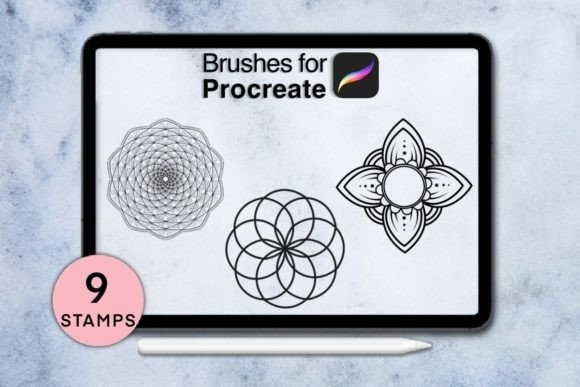
Mandala art, characterized by its radial balance and complex symmetry, has traditionally required significant time and precision to construct by hand. In a digital environment, the 9 Mandala Stamps serve as pre-configured assets that allow users to place these complex structures instantly. Unlike standard brushes that rely on continuous stroke input, stamp brushes function more like dynamic stickers or pattern generators. When tapped or dragged onto the canvas, they deploy a complete design element.
The distinct value proposition here is efficiency. For an artist working on a tight deadline, such as creating social media content, greeting cards, or background textures, the ability to generate a high-fidelity mandala in seconds is a substantial advantage. However, it is crucial to recognize that these are not magic solutions for original composition. They are building blocks. The artistic merit comes from how the user layers, colors, rotates, and blends these stamps with other elements. The set typically includes nine variations, offering enough diversity to prevent repetitive visual fatigue while maintaining a cohesive aesthetic theme.
Comparison with Manual Drawing and Generic Pattern Tools
When evaluating 9 Mandala Stamps, it is helpful to compare them against two primary alternatives: manual drawing using symmetry guides and generic pattern libraries.
Manual Drawing with Symmetry Guides
Procreate’s built-in Drawing Guide offers a robust symmetry tool that allows artists to draw one quadrant while the app mirrors the action across multiple axes. This method offers unparalleled creative freedom, as every line is unique and responsive to the artist’s hand pressure and tilt.
- Strengths: Complete originality, organic feel, and total control over line weight and detail.
- Tradeoffs: High time investment and a steep learning curve for complex geometries.
- Verdict: Choose manual drawing when the project requires a bespoke, hand-crafted look where imperfection adds character.
Generic Pattern Libraries
Many stock image websites offer vector or raster mandala files. These are static images that can be imported into Procreate.
- Strengths: Extremely high resolution options available; no need for specific apps.
- Tradeoffs: Lack of integration with the drawing workflow; difficult to edit individual lines; often looks "pasted on" rather than integrated.
- Verdict: Use static libraries for print layouts where the image will not be altered, but avoid them for dynamic digital painting.
The Niche of Stamp Brushes
The 9 Mandala Stamps occupy a middle ground. They offer more integration than static images because they exist within the Procreate brush engine, allowing for opacity and flow adjustments. They are significantly faster than manual drawing. However, they lack the infinite variability of a hand-drawn piece. They are best suited for projects where consistency and speed are prioritized over unique, one-off geometry.
Technical Requirements and Compatibility Considerations
Before acquiring any digital brush set, verifying technical compatibility is a critical step in the decision-making process. The 9 Mandala Stamps are designed specifically for the iPad ecosystem. Users must ensure they meet the following criteria to avoid functionality issues:
- Hardware: An iPad Pro or an iPad model that supports the Apple Pencil or a third-party stylus with pressure sensitivity. Without pressure sensitivity, the nuanced behavior of the brush—such as varying opacity based on touch strength—may not function as intended.
- Software: Procreate Version 5.0 or higher. Older versions may not support the specific file formats or brush engines used in modern stamp sets.
- Digital Nature: It is vital to understand that this is a digital download. No physical object will be shipped. The product is delivered instantly via file transfer, requiring the user to have a method to import files into their iPad, such as iCloud Drive, AirDrop, or a direct download link.
Additionally, potential buyers should note that promotional materials, including mockups and example artworks, are for presentation purposes only. The fonts, background textures, and additional illustrative elements seen in marketing images are not included in the purchase. This distinction is important for managing expectations regarding the scope of the product.
Best-Fit Scenarios for Using Mandala Stamps
Identifying whether this tool fits your needs depends largely on your typical workflow. Here are scenarios where 9 Mandala Stamps provide significant value:
Adult Coloring Book Creation
Creators who design coloring pages for adults often need complex, symmetrical outlines. Using stamps can accelerate the base structure creation, allowing the designer to focus on adding unique flourishes or connecting elements between the mandalas.
Social Media and Content Marketing
Digital marketers and content creators frequently need visually appealing backgrounds or decorative elements for quotes and announcements. The instant nature of the download and the ease of use in Procreate make these stamps ideal for rapid content production where high-volume output is required.
Meditation and Wellness Apps
Designers working on wellness-related projects often utilize mandala imagery for its calming associations. Having a reliable set of nine distinct styles allows for variety in app interfaces or printed materials without needing to commission custom illustrations for every screen.
Limitations and When to Seek Alternatives
While efficient, stamp brushes have inherent limitations. If your goal is to create a highly personalized, narrative-driven illustration where the mandala serves as a central, evolving character or plot device, pre-made stamps may feel restrictive. The repetition of shapes can become obvious if the same stamp is used multiple times in a single composition without significant modification.
Furthermore, artists who prefer a purely organic, hand-drawn aesthetic may find the geometric perfection of digital stamps too rigid. In such cases, investing time in mastering Procreate’s symmetry tools or purchasing brushes that simulate traditional ink pens might yield more satisfying results. Additionally, if you do not own an iPad or prefer desktop-based software like Adobe Photoshop or Illustrator, this specific product is not compatible, and you would need to seek vector-based alternatives or Photoshop actions instead.
Making an Informed Decision
Choosing the right digital resources involves balancing cost, time, and creative intent. The 9 Mandala Stamps offer a practical solution for artists who value efficiency and enjoy layering pre-made elements into their compositions. They are particularly effective for those who already work within the Procreate ecosystem and need to reduce the time spent on repetitive geometric constructions.
However, they are not a substitute for fundamental design skills. The most successful users will treat these stamps as a starting point, modifying colors, blending modes, and compositions to create something unique. If you are comfortable with digital file management, possess the necessary hardware, and seek to enhance your productivity in pattern-based design, this tool set warrants consideration. Conversely, if you prioritize total originality in every stroke or work outside the Apple ecosystem, exploring manual techniques or cross-platform vector tools may be a more suitable path.
For those interested in proceeding, ensure you have the required Procreate version and a compatible stylus ready. As with any digital asset, reviewing the seller’s support options is advisable; in this case, direct messaging is available for questions, providing a layer of consumer confidence. By aligning the tool’s capabilities with your specific project requirements, you can effectively integrate 9 Mandala Stamps into a versatile and efficient digital art workflow.