Evaluating Gem Procreate Brush Stamps for Digital Illustration Workflows
Digital illustration has evolved from simple line work to complex, textured compositions that mimic traditional media with remarkable fidelity. For artists working within the iPad ecosystem, the efficiency of their workflow often depends on the quality and versatility of their toolset. Gem Procreate Brush Stamps represent a specialized category of digital assets designed to streamline the creation of jewelry, crystals, and precious stones in artwork. Unlike standard painting brushes that require manual rendering of light refraction and facets, stamp brushes offer pre-rendered, hand-drawn elements that can be integrated instantly into a composition.
Understanding whether this specific toolset aligns with your artistic needs requires a clear look at what these brushes offer, how they compare to manual drawing or other digital assets, and the practical considerations of integrating them into a professional workflow. This analysis explores the utility of the Mystic Gem Collection, focusing on its technical specifications, ease of use, and suitability for various illustration styles.
What Defines the Gem Procreate Brush Set?
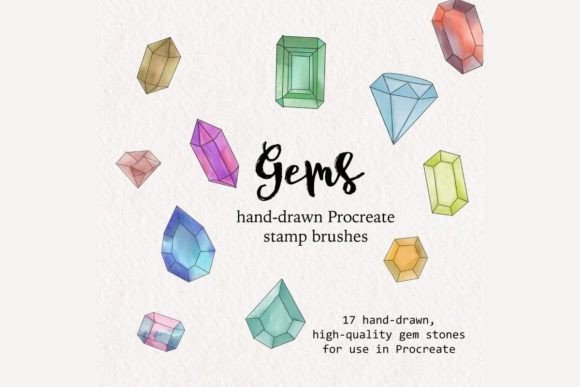
The core value proposition of Gem Procreate Brush Stamps lies in their hybrid nature. They are not merely static images pasted onto a canvas; they are functional brushes within the Procreate application. This distinction is crucial for artists who prioritize non-destructive editing and flexibility. The set includes 17 high-quality gem brushes, covering a diverse spectrum of stones such as emeralds, citrines, diamonds, rubies, sapphires, and peridots. Each brush stamp is hand-drawn, ensuring that the organic imperfections and unique light patterns characteristic of natural stones are preserved, rather than relying on sterile, computer-generated geometry.
Technically, these brushes are delivered in the .brushset format, which is native to Procreate. This ensures compatibility and stability within the app. Upon purchase, users receive the digital file along with a PDF containing installation instructions. It is important to note that this is a purely digital product; no physical items are mailed. Consequently, the primary requirement for utilizing these resources is ownership of the Procreate application on an iPad. Without this specific software, the brushes cannot be accessed or used.
Customization and Workflow Integration
One of the significant advantages of using stamp brushes over static clipart is the level of control retained by the artist. Once a gem stamp is placed on the canvas, it behaves like any other raster layer. This means artists can easily modify the size, position, and color without losing resolution or clarity, provided the initial stamp is of high quality. The ability to adjust hue and saturation allows a single diamond brush to be adapted into a sapphire or aquamarine with minimal effort, expanding the utility of the 17 included designs.
The installation process is designed to be straightforward, catering to both novice and experienced users. The included PDF instructions guide the user through importing the .brushset file, a process that typically takes only a few minutes. This ease of entry lowers the barrier for artists who may be intimidated by complex plugin installations or third-party software integrations.
Comparing Stamp Brushes to Manual Rendering
When evaluating Gem Procreate Brush Stamps, it is essential to compare them against the alternative: manually painting gems from scratch. Manual rendering offers ultimate creative freedom. An artist can control every facet, reflection, and inclusion, tailoring the stone to match a specific lighting environment perfectly. However, this approach is time-intensive. Rendering a realistic diamond with accurate light dispersion can take hours, even for skilled illustrators.
In contrast, stamp brushes prioritize efficiency. They are ideal for projects with tight deadlines or illustrations where gems are secondary elements rather than the focal point. For example, in a character design featuring a jeweled necklace, the focus should remain on the character’s expression and posture. Using a high-quality gem stamp allows the artist to add intricate detail to the accessory in seconds, preserving energy for the primary subjects of the piece.
However, there are tradeoffs. While the hand-drawn nature of these stamps provides a natural look, they may not perfectly match the specific lighting angle of a complex scene without additional manual adjustment. Artists may need to paint in highlights or shadows manually to integrate the stamp seamlessly into the environment. Therefore, these brushes are best viewed as a foundational layer or a time-saving shortcut rather than a complete replacement for artistic judgment.
Assessing Quality and Versatility
The term "high-quality" in digital brushes often refers to resolution and edge definition. Low-resolution stamps can appear pixelated when scaled up, ruining the illusion of realism. The Mystic Gem Collection emphasizes high-resolution source material, ensuring that the gems remain crisp even when resized for larger compositions. The variety included—ranging from the deep greens of emeralds to the fiery brilliance of rubies—covers the most commonly requested stones in fantasy and fashion illustration.
Versatility is further enhanced by the ability to combine different stamps. An artist might layer a diamond stamp over a gold ring base created with a separate metal brush, creating a composite object that looks bespoke. This modular approach allows for endless combinations, making the 17-brush set feel more extensive than its numerical count suggests.
Limitations and Considerations
Despite their benefits, Gem Procreate Brush Stamps are not a universal solution. Artists working in highly stylized, abstract, or minimalist styles may find pre-rendered realistic gems incongruous with their aesthetic. In such cases, custom-drawn shapes that adhere to the specific style guide of the project would be more appropriate.
Additionally, reliance on stamps can potentially hinder skill development for beginners. If an artist exclusively uses stamps for all hard-surface objects, they may miss opportunities to learn the underlying principles of light, form, and material rendering. It is advisable to use these tools as part of a broader toolkit, complementing them with fundamental drawing practice.
Decision Factors: Is This Set Right for You?
Choosing the right digital assets depends on your specific workflow, project types, and technical setup. Here are key factors to consider when evaluating Gem Procreate Brush Stamps:
- Software Compatibility: You must have Procreate on an iPad. These brushes are not compatible with Photoshop, Clip Studio Paint, or desktop-based applications. If your workflow is primarily desktop-based, this product will not be useful.
- Project Volume: If you frequently illustrate characters with jewelry, fantasy scenes with treasure, or fashion designs, the time saved by using stamps can be substantial. For occasional use, the investment may be less justifiable compared to free alternatives or manual drawing.
- Style Alignment: The hand-drawn, realistic style of the Mystic Gem Collection suits semi-realistic, fantasy, and romantic illustration styles. It may not fit ultra-modern, flat-design, or cartoon aesthetics without significant modification.
- Technical Comfort: While installation is simple, users should be comfortable managing digital files and importing them into apps. The inclusion of a PDF guide mitigates most technical hurdles, but basic digital literacy is required.
Alternatives and Market Context
The market for Procreate brushes is vast, ranging from free community-created sets to premium professional packs. Free alternatives often lack the consistency and resolution of paid sets like the Gem Procreate Brush Stamps. They may also come with restrictive licenses or poor organization. On the other end of the spectrum, some premium sets offer hundreds of variations but can overwhelm users with choice paralysis. The 17-brush count of this set strikes a balance, offering enough variety for most needs without cluttering the brush library.
Another alternative is using 3D models rendered into 2D images. This approach offers perfect perspective and lighting control but requires knowledge of 3D software and a more complex workflow. For most 2D illustrators, the simplicity of a stamp brush is preferable to the technical overhead of 3D rendering.
Final Thoughts on Utility and Value
Gem Procreate Brush Stamps serve a specific, valuable niche in the digital artist’s toolkit. They are not a magic solution for all illustration challenges, but they are a highly effective resource for adding detailed, realistic gemstones to artwork efficiently. The hand-drawn quality ensures that the results feel organic and integrated, while the digital format allows for easy customization and non-destructive editing.
For artists who value their time and frequently incorporate jewelry or crystals into their work, this set offers a practical advantage. It reduces repetitive tasks, allowing more focus on creativity and composition. However, it is essential to recognize its limitations regarding style compatibility and software requirements. By understanding these factors, artists can make an informed decision about whether integrating these stamps into their workflow will enhance their creative process.
Ultimately, the decision to purchase digital brushes should be based on how well they solve a specific problem in your current workflow. If rendering gems manually is a bottleneck in your production, Gem Procreate Brush Stamps provide a streamlined, professional-grade alternative that respects the integrity of your artistic vision while boosting efficiency.