Evaluating the Mini Sunflowers Procreate Brush Set for Digital Illustration
Digital illustration has evolved from a niche hobby into a robust professional industry, driven largely by the accessibility of powerful tools like the iPad and the Procreate application. For artists, designers, and content creators, efficiency is often just as valuable as raw talent. This is where specialized assets, such as stamp brushes, play a critical role in streamlining workflows. The Mini Sunflowers Procreate Brush set represents a specific type of digital asset designed to expedite the creation of floral elements without sacrificing aesthetic quality. Understanding how this tool functions, its technical requirements, and its practical application can help creators determine if it aligns with their artistic goals.
Understanding the Utility of Stamp Brushes
Before diving into the specifics of the sunflower set, it is important to contextualize what a stamp brush actually does within the Procreate ecosystem. Unlike standard painting brushes that rely on continuous stroke input to create texture or line weight, a stamp brush places a pre-designed image onto the canvas with a single tap or press. This distinction is crucial for workflow optimization. For professionals working on tight deadlines, such as greeting card designers, social media managers, or pattern makers, manually painting every petal of a flower is often an inefficient use of time.
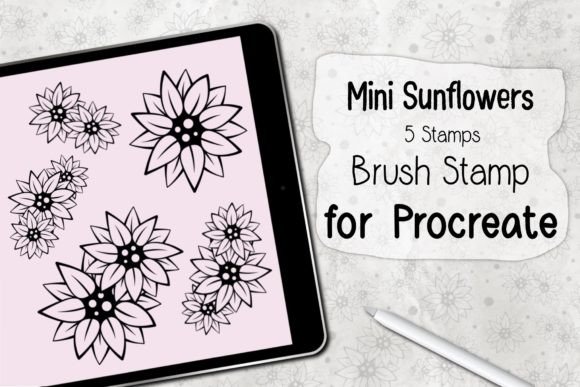
The Mini Sunflowers Procreate Brush set leverages this technology to provide instant, consistent floral imagery. The set includes five distinct stamps, offering variety while maintaining a cohesive visual style. This consistency is vital for branding and professional projects where uniformity across multiple designs is required. By utilizing these stamps, artists can focus more on composition, color grading, and layout rather than getting bogged down in the repetitive mechanics of drawing individual botanical elements.
Technical Specifications and Compatibility
One of the most significant aspects of any digital asset is its compatibility with existing hardware and software. The Mini Sunflowers set is designed specifically for the Apple ecosystem, which ensures a high level of performance stability but also imposes certain restrictions. To utilize this brush set effectively, users must meet specific technical criteria.
- Hardware Requirements: An iPad Pro or a standard iPad model is required. Additionally, an Apple Pencil or a compatible, pressure-sensitive stylus is necessary to ensure proper interaction with the Procreate interface.
- Software Requirements: The brushes are optimized for Procreate Version 5.0 and higher. Users with outdated versions of the app may experience installation errors or functionality issues.
- File Format: The product is delivered as a ZIP file containing a single .brushset file. This format is native to Procreate, facilitating a straightforward installation process.
It is imperative to note that these brushes will work ONLY in the Procreate application. They are not compatible with Adobe Fresco, Photoshop, Clip Studio Paint, or other digital art platforms. This limitation is common for proprietary brush formats but requires users to be committed to the Procreate workflow. For freelancers who switch between multiple applications, this means the asset’s value is confined to projects executed within the Apple iPad environment.
Installation and Usability
The ease of installation is a key factor in the user experience of digital assets. Complex setup processes can deter users, especially those who are less technically inclined. The Mini Sunflowers Procreate Brush set is designed for simplicity, reflecting a user-centric approach to digital product design.
- Download and Extract: After purchasing or acquiring the asset, the user downloads the ZIP file. The first step is to unzip or extract the contents to reveal the .brushset file.
- Open in Procreate: By selecting the "Open In" option and choosing Procreate, the application automatically recognizes the file type.
- Automatic Installation: Procreate installs the brush set directly into the Brush Library. No manual importing or folder management is required.
- Access: The five mini sunflower stamps appear in the library, ready for immediate use.
This seamless integration allows creators to move from acquisition to application rapidly. Once installed, the brushes behave like any other tool in the Procreate library. Users can adjust size, opacity, and placement using the Apple Pencil, providing a degree of flexibility despite the pre-defined nature of the stamp.
Practical Applications and Workflow Integration
The true value of the Mini Sunflowers Stamp Brush set lies in its practical application across various creative disciplines. For marketers and small business owners, visual content is a primary driver of engagement. Creating unique, hand-drawn aesthetics for social media posts, email headers, or digital advertisements can be time-consuming. This brush set allows non-artists or busy entrepreneurs to add a touch of organic, hand-crafted charm to their materials without needing advanced drawing skills.
For professional illustrators and surface pattern designers, the set serves as a foundational element. While a seasoned artist might prefer to draw custom flowers for a high-end commission, the mini sunflowers can serve as excellent placeholders during the conceptual phase. Furthermore, they can be used as base layers that are subsequently painted over, modified, or combined with other elements to create complex compositions. The five variations included in the set prevent the repetition that often plagues lower-quality stamp brushes, allowing for more natural-looking arrangements.
Educators and bloggers also benefit from such assets. When creating educational materials, worksheets, or blog graphics, speed and clarity are paramount. The clean, recognizable shape of the mini sunflowers can enhance visual aids, making content more engaging for students and readers alike. The ability to quickly populate a page with decorative elements allows educators to focus on pedagogical content rather than graphic design intricacies.
Quality, Consistency, and Limitations
When evaluating the quality of the Mini Sunflowers Procreate Brush, several factors come into play. The resolution and clarity of the stamps are critical; pixelation or blurry edges can undermine the professional appearance of a final piece. High-quality stamp brushes maintain sharpness even when scaled, although extreme enlargement should always be avoided to preserve integrity.
The strength of this set is its consistency. Each stamp shares a similar stylistic language, ensuring that when multiple flowers are used in a single composition, they look like they belong together. This cohesion is difficult to achieve when mixing disparate assets from different sources. However, this consistency is also a limitation. Artists seeking highly diverse or realistic botanical accuracy may find the stylized nature of these mini sunflowers restrictive. They are best suited for whimsical, decorative, or semi-abstract styles rather than hyper-realistic scientific illustration.
Another consideration is the lack of customization inherent in stamp brushes. Unlike a dynamic paint brush that responds to tilt, pressure, and speed to create varied strokes, a stamp is static. While you can rotate and resize it, the internal structure of the flower remains unchanged. Therefore, the Mini Sunflowers Procreate Brush is best viewed as a complementary tool rather than a replacement for fundamental drawing skills. It enhances productivity but does not replace the need for artistic judgment in composition and color theory.
Long-Term Value for Creators
Investing in digital assets like the Mini Sunflowers set is often about long-term return on investment regarding time saved. For a freelancer billing by the hour, reducing the time spent on repetitive decorative elements can significantly increase profitability. For a hobbyist, it reduces frustration and lowers the barrier to entry for creating polished, professional-looking art.
The durability of the asset is another point in its favor. Unlike physical supplies that deplete, digital brushes do not wear out. Once installed, they remain available for unlimited use across countless projects. As long as Procreate continues to support the .brushset format, this tool remains a permanent part of the creator’s toolkit. Given the relatively low cost compared to the hours of manual labor it saves, the economic value proposition is strong for regular users of the platform.
In conclusion, the Mini Sunflowers Procreate Brush set is a practical, efficient tool for a wide range of digital creators. It excels in scenarios where speed, consistency, and decorative appeal are prioritized. While it has limitations regarding customization and platform exclusivity, its benefits in streamlining workflow and enhancing visual content make it a worthwhile addition for iPad-based artists, designers, and content creators looking to optimize their creative process.