Mastering Digital Ink: A Practical Review of the INK. for CSP 41 Sub-Tools Set
For digital artists transitioning from traditional media, or for seasoned professionals seeking to refine their line work, the quality of brush engines is paramount. Clip Studio Paint (CSP) is widely recognized for its robust inking capabilities, yet the default library often requires significant customization to achieve specific aesthetic goals. This is where specialized asset packs like INK. for CSP 41 Sub-Tools for Inking become valuable resources. Designed to replicate the tactile resistance and fluid dynamics of real-world instruments, this collection offers a curated suite of tools aimed at enhancing precision and artistic expression.
This evaluation explores the functionality, compatibility, and practical application of the INK. set, providing insights for illustrators, comic creators, and graphic designers who prioritize high-fidelity line art.
Core Components and Asset Structure
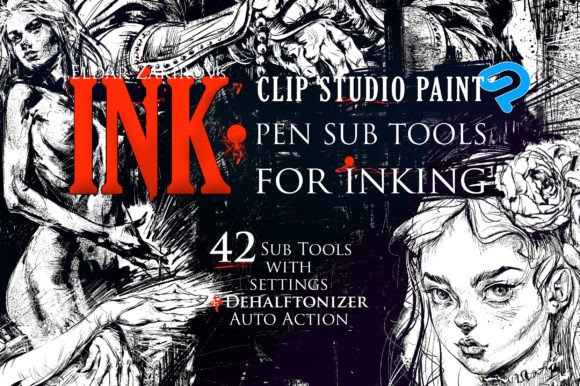
The INK. for CSP package is structured to provide immediate usability while offering depth for advanced users. The core of the product consists of 41 sub-tools, archived in a ZIP file titled “INK. Sub Tools Archive.zip.” Each tool is saved as an individual .sut file, ensuring that users can import specific brushes without cluttering their workspace with unused assets. This modular approach is particularly beneficial for professionals who maintain organized libraries tailored to specific project types.
Beyond the brushes themselves, the set includes two critical auxiliary components:
- DEHALFTONIZER Auto Action: Provided in two formats to ensure broad compatibility. The standard “Hard INK Drawing.laf” works with modern CSP versions, while “DEHALFTONIZER, Hard INK Drawing-for Manga Studio.laf” supports legacy users of Manga Studio 5. This action automates the conversion of halftone patterns into solid ink lines, a tedious process when done manually.
- Documentation and Reference Materials: The package includes a PDF manual (“INK. for CSP, Documentation, Manual FAQs.pdf”) addressing setup and common queries. Additionally, a high-resolution stroke chart (4568 × 2695 px) visually catalogs every brush, displaying title labels and stroke trails subdivided by category.
Brush Categories and Functional Design
The 41 sub-tools are not merely variations of a single pen; they are engineered to simulate distinct physical instruments. The collection is broadly categorized to address different stages of the inking process, from rough sketching to final polished lines.
Sharp Nibs and Precision Instruments
Ten of the included brushes fall under the “Sharp Nibs” category. These tools are designed for clarity and definition, mimicking the behavior of technical pens or fine-point nibs. In practical testing, these brushes exhibit minimal bleed, making them ideal for intricate details, mechanical drawings, or architectural elements within a composition. The pressure sensitivity settings are tuned to reward steady hand movements, providing consistent line weight that responds predictably to stylus input.
Simulated Ruling Pens and Cola Brushes
A standout feature of the INK. set is its simulation of broader, wetter instruments. Several brushes replicate the work of the side surface of a ruling pen or cola brushes. These tools introduce a degree of organic irregularity that is difficult to achieve with standard digital circles or ellipses. They are particularly effective for creating bold, expressive outlines or filling larger areas with textured strokes. The variation in opacity and edge hardness allows for layering effects that mimic the accumulation of real ink on paper.
Splash and Blot Effects
To enhance realism, the set includes three splash blot brushes identical to the popular SPLASHES Brush set. These are not intended for primary line work but serve as decorative or atmospheric elements. They allow artists to add accidental spills, texture breaks, or dynamic motion lines without leaving the canvas. When used sparingly, these blots can break the sterile perfection of digital art, adding a layer of authenticity that resonates with audiences accustomed to traditional media.
Compatibility and Technical Reliability
One of the primary concerns when purchasing third-party assets is software compatibility. The INK. for CSP sub-tools were rigorously tested across multiple environments, including CSP versions 1.6.2 and 1.6.3, as well as Manga Studio 5. Given the backward-compatible nature of Clip Studio’s engine, these tools function seamlessly in all newer versions, including CSP 2.0 and above.
The inclusion of separate Auto Action files for Manga Studio users demonstrates attention to detail. Legacy users often struggle to find modern assets that do not rely on newer scripting features. By providing a dedicated .laf file for older software, the creators ensure that the DEHALFTONIZER function remains accessible to a wider audience. This inclusivity enhances the long-term value of the product, as it does not force users to upgrade their software solely to utilize the purchased assets.
Practical Workflow Integration
Integrating the INK. for CSP 41 Sub-Tools into a professional workflow requires an understanding of their specific strengths. The tools are not universal solutions; rather, they are specialized instruments for specific tasks.
For Comic and Manga Creators: The DEHALFTONIZER Auto Action is arguably the most time-saving feature. Converting screentones to solid black ink is a frequent requirement in manga production. Automating this process reduces repetitive strain and minimizes human error. Combined with the sharp nibs for dialogue balloons and panel borders, the set streamlines the finishing phase of comic creation.
For Illustrators and Concept Artists: The ruling pen simulations offer a unique aesthetic for concept sketches. The ability to vary line width dynamically using the side of the virtual pen allows for rapid exploration of form and shadow. This mimics the traditional technique of using a brush’s belly for shading and its tip for detailing, facilitating a more intuitive drawing experience.
For Graphic Designers: The splash blots and textured strokes can be utilized in branding or poster design to introduce organic elements into vector-heavy layouts. These assets provide a quick way to add grit and character without requiring extensive photo manipulation.
Evaluation of Quality and Usability
The quality of the INK. for CSP set lies in its restraint. Rather than overwhelming the user with hundreds of redundant variations, the 41 tools are distinct and purposeful. The settings for each sub-tool have been calibrated to balance responsiveness with stability. Users report that the brushes do not lag, even when used on high-resolution canvases with complex layer structures.
However, there is a learning curve. The simulated ruling pens, in particular, require adjustment to pressure sensitivity settings. Users accustomed to uniform digital lines may initially find the variability frustrating. The included stroke chart is essential in this phase, allowing artists to preview the output of each brush before committing to a stroke. Reading the provided PDF manual is recommended to understand the nuanced settings, such as stabilization levels and ink density adjustments.
A potential limitation is the specificity of the style. The “Hard INK” aesthetic is bold and high-contrast. Artists seeking soft, watercolor-like transitions or pencil-sketch textures will not find them in this pack. It is strictly focused on the aesthetics of permanent ink. Therefore, it is best viewed as a specialized addition to a broader library rather than a standalone solution for all artistic needs.
Final Recommendations
The INK. for CSP 41 Sub-Tools for Inking is a robust resource for digital artists who value the look and feel of traditional ink. Its strength lies in the diversity of its nib simulations and the utility of its accompanying Auto Actions. While it requires a brief period of adjustment to master the pressure dynamics of the broader brushes, the payoff is a more organic and expressive line quality.
This set is highly recommended for:
- Manga and comic artists looking to automate tone conversion and enhance line variety.
- Illustrators seeking to break away from the uniformity of default digital brushes.
- Traditional artists transitioning to digital platforms who miss the tactile feedback of ruling pens and nibs.
For professionals and serious hobbyists alike, this collection offers a tangible improvement in workflow efficiency and artistic versatility. By bridging the gap between digital precision and analog charm, the INK. for CSP set proves itself to be a worthwhile investment for any creator serious about their craft.